For InstantAdPay members · BixPay is a separate company
Spend your POL anywhere with a BixPay Visa card.
BixPay is a self-custody wallet with a Visa card. Send USDT or USDC to it on Polygon, load the card, and spend it wherever Visa is accepted, including Apple Pay and Google Pay. Virtual cards from $9.99. 3% per purchase, no load fee. See BIX's terms for other charges.
The button opens a BixPay partner sign-up link.
The BixPay card is not switched on for InstantAdPay members yet. Check back soon.
Available in 31 US states so far. Not in your state yet? You can still get the wallet and build. Elsewhere, availability varies by country.
What it is
A wallet you hold, a card you can actually use
Self-custody
The BIX app is a wallet where the keys stay with you. It is not an exchange account. You hold the USDT or USDC that backs your card.
A Visa card on top
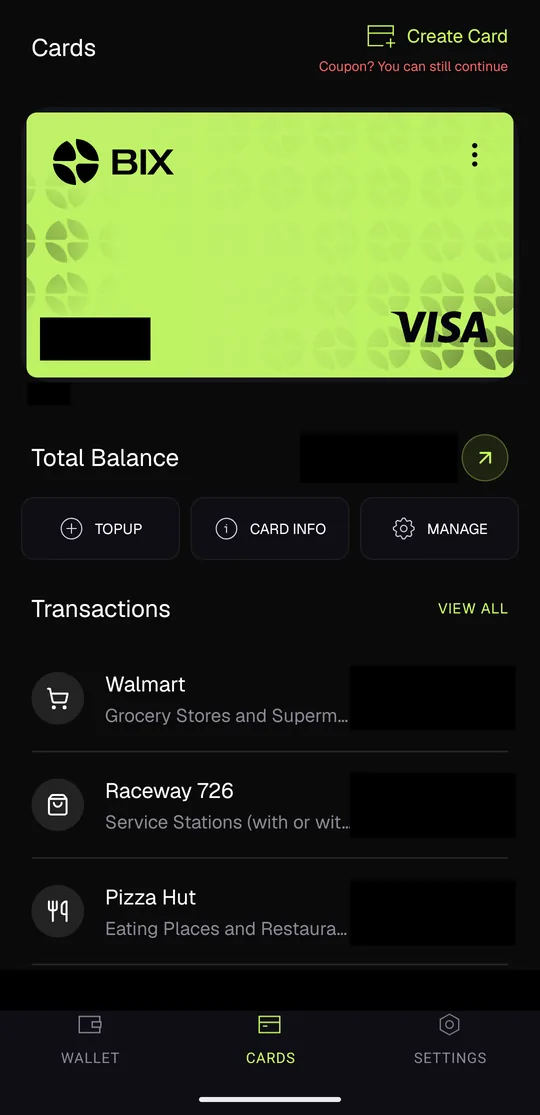
Create a virtual card in the app for $9.99 and it works wherever Visa is accepted, online and in stores through Apple Pay and Google Pay. Plastic, metal and gold cards cost more.
Loads on Polygon
Your InstantAdPay payouts land as POL on Polygon. Turn them into USDT or USDC, send that to your BixPay wallet on Polygon, and top up the card. No bridge, no bank wait.
What it costs
3% per purchase, no load fee. Other charges, limits and eligibility are set by BIX; read BIX's terms before you start. We quote only the fee we can stand behind.
Why we added it
How BixPay pays you, in plain words
BixPay runs a partner plan on top of the card, and InstantAdPay members plug into it with one link. Nothing here is paid by InstantAdPay: BIX tracks and pays its partners in the BIX portal, and InstantAdPay earns a referral commission when someone signs up through a partner link. Here is the plan as BIX describes it.
| Piece | What BIX says it does |
|---|---|
| The fee | 3% of each card purchase. That is the only fee we quote; BIX's terms cover the rest. |
| What goes into the plan | Half of the purchase fees and half of card sales (the $9.99 virtual card and the others) go to partners. |
| Ten levels | Level 1 gets 15% of the fee, level 2 gets 10%, and levels 3 to 10 get 2.5% each. |
| The pool | The remaining 5% goes into a pool shared by partners with large networks, on BIX's own rules. |
| Card sales count too | A card bought by someone in your BixPay network pays the same way as spending does. |
A hypothetical, not a typical result
If someone in your BixPay network spends $1,000 on their card in a month, the fee on that is $30. BIX says it pays the level-1 partner 15% of that fee ($4.50), the level-2 partner 10% ($3.00) and each of levels 3 to 10 a quarter of one percent of the spend ($0.75 each). That is arithmetic on BIX's published percentages, not a prediction. What anyone earns depends on how many people in their network get and use a card, and on BIX paying as described. Nobody at InstantAdPay promises any amount.
Who gets the credit
One link, and your sponsor follows
Sign-ups and commissions are counted inside the BIX portal, where each partner sees their directs and levels. InstantAdPay only counts the clicks on its own buttons, so you can see which page or post is working.
Get the card
Sign up as a partner, then create the card
Open a partner link
Tap Get your BixPay card above (or on your Wallet tab). It opens a BixPay partner sign-up, not the plain card-customer one, so the referral plan comes with the card.
Create your BIX portal account
Register on the page that opens (bix.ibportal.io). This is your partner back office: it shows your directs and levels and, under Profile, your own two links. The second one, labelled Partner, is the one you will paste into InstantAdPay later.
Download the BIX app and create your wallet
Install BixPay from your phone's app store and create the wallet in the app. Write the recovery phrase down and keep it offline: self-custody means nobody can reset it for you.
Link the app to your portal
In the app open Settings > Scan QR and scan the QR code shown in your portal profile. That ties the wallet and card to your partner account so your activity counts.
Create your card
In the app, Cards > Create Card. The virtual Visa is $9.99 and is ready as soon as you have passed BIX's identity check (KYC). Add it to Apple Pay or Google Pay from the card screen.
Funding your card
From POL to a card you can swipe
The card spends USDT or USDC, so the one extra step is turning POL into one of those. Three ways:
Swap on an exchange, then send on Polygon
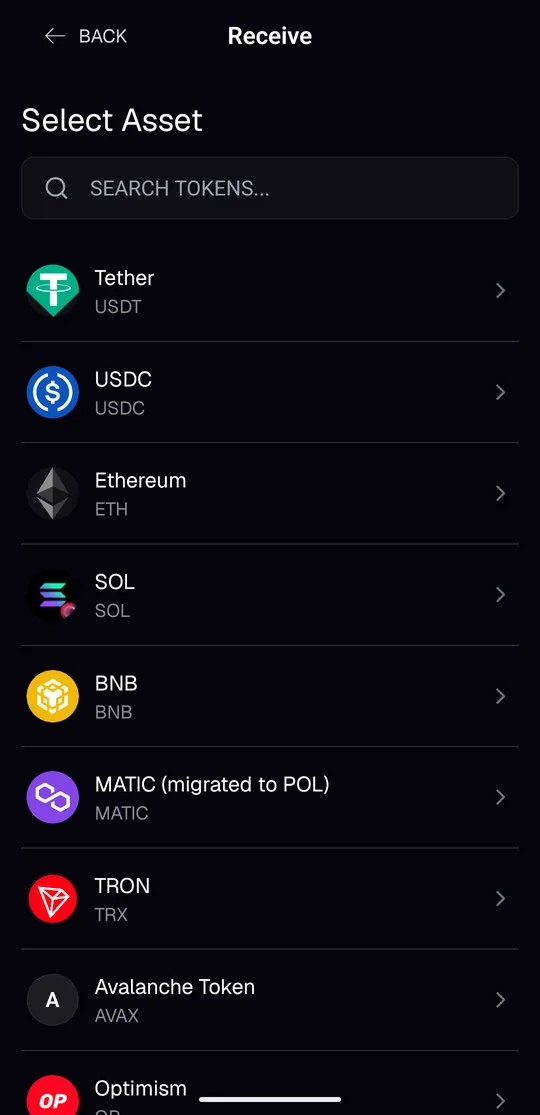
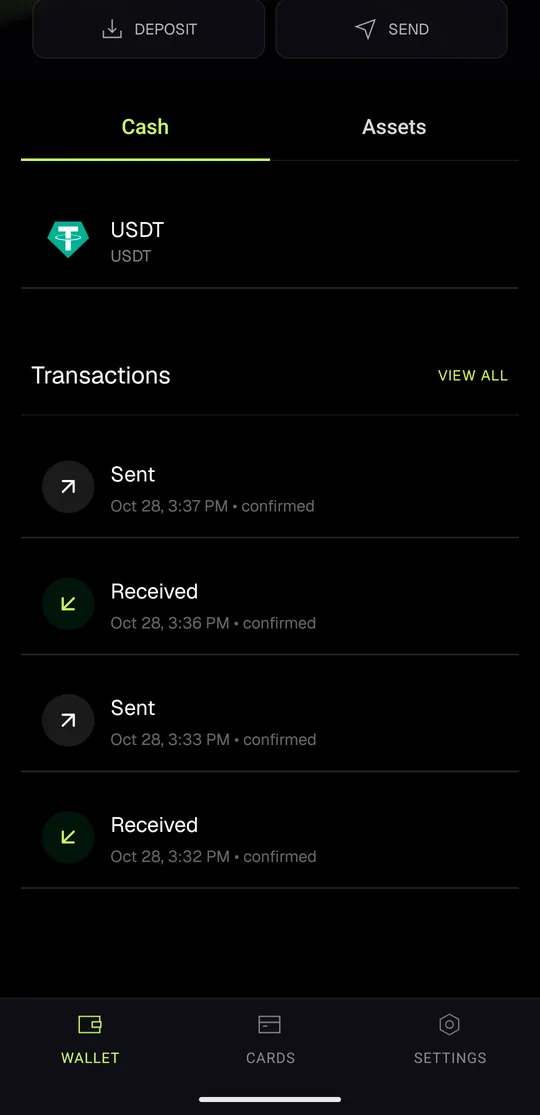
Swap your POL for USDT or USDC on any exchange or on-ramp you already use. Then in the BIX app open Wallet > Receive, pick USDT or USDC, choose the Polygon network and send to that address. A minute later it shows in the wallet's Cash tab; tap TOPUP on your card to load it.
Pick Polygon on both ends. Sending on another network to a Polygon address can lose the funds, and nobody can reverse it.
Cash App (US)
If you use Cash App, it can send crypto straight to your BixPay wallet. Handy for topping up from dollars without an exchange account. Cash App sets its own limits.
The in-app swap, once BIX ships it
BIX has said a swap inside the app is coming. The wallet already receives POL ("MATIC (migrated to POL)" in the Receive list), so once the swap is live you will be able to send POL straight in and swap there. We will update this page when it ships; until then use one of the two paths above.
If something goes wrong
Disputes and protection
Disputing a charge
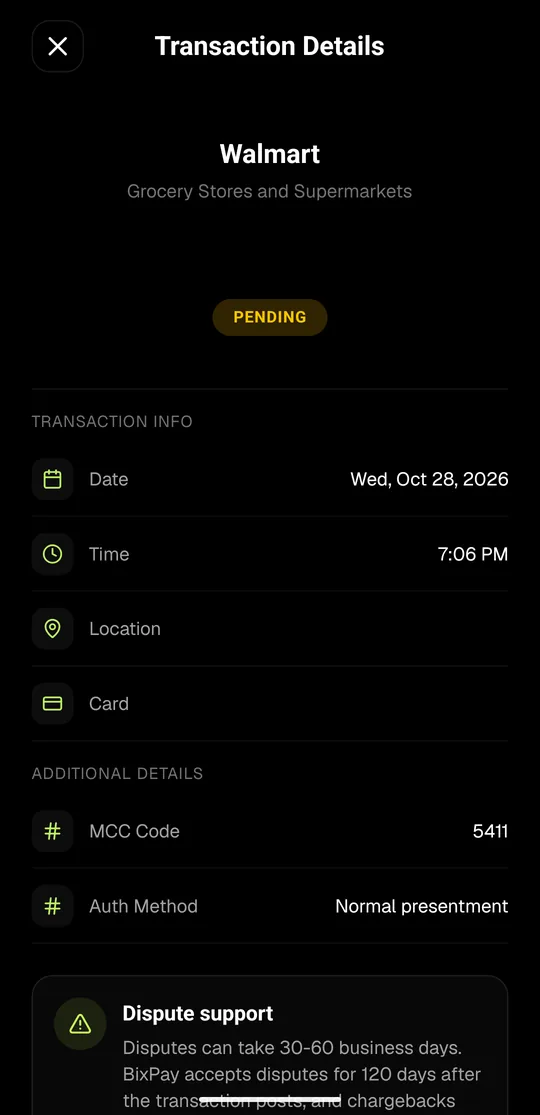
Every transaction in the app shows the merchant, the date, the category code and a Dispute support box. BIX accepts a dispute for 120 days after a transaction posts, and says a dispute can take 30 to 60 business days.
What InstantAdPay can and cannot do
We can help you find your partner link, explain the steps and point you to the right screen. We cannot see your BixPay wallet, your card or your balance, and we cannot file a dispute for you. Card problems go to BIX support inside the app.
Quick answers
Questions members ask
- Do I have to be a partner to get the card?
- Our buttons open a partner link, so you register as a partner and get the card through the same app. There is no extra cost to being a partner; it just means card sign-ups through your own link are credited to you.
- Where do I put my partner link on InstantAdPay?
- Members > Profile > BixPay card. Copy the Partner link from your BIX portal profile (the second box). The field refuses the first box's referral link (it ends in appId=3) because that one only makes a card customer.
- Can I send POL straight to the card?
- Not yet. Turn it into USDT or USDC first (any exchange, or Cash App in the US), then send on Polygon. When BIX ships its in-app swap we will add that path here.
- Is my money safe there?
- It is a self-custody wallet, so it is as safe as your recovery phrase. Keep the phrase offline and never type it into a website. And remember that USDT, USDC and POL are crypto assets: they can lose value.
- What does InstantAdPay get out of it?
- A referral commission from BIX when someone signs up through a partner link, the same plan every partner is on. We are not the card issuer and we do not hold any of your funds.
- Can I share this page with my own link?
- Yes. Members > Promo tools > BixPay has your link, three posts, an email swipe and four banners, plus a click count. Promo tools > Viral links turns this page into
instantadpay.com/bixpay?ref=yourname, and the button on it then carries your link.
The partner plan figures on this page are BIX's published percentages as of October 2026 and can change at BIX's discretion. Any example is arithmetic, not a prediction; no income is guaranteed or implied, and any commission depends on real card sign-ups and spending in your network. InstantAdPay sells advertising; it is not an investment product and does not hold customer funds.